
Digital Audit:
How Your Website, CRM, SEO and Analytics Should Work Together


Introduction
Today, a website is much more than a page on the internet or a polished company presentation, and a digital audit is often the best way to see what it really does for your business. For many businesses, it is one part of a wider digital system that includes advertising, SEO, CRM, analytics, content, sales, follow-up communication, and automation.
Before building a new website, launching ads, or connecting a CRM, a business should understand where it stands right now: what already works, where leads get lost, which channels deliver results, whether analytics is set up correctly, and whether there are technical risks around hosting, access, backups, and ownership.
That is exactly what a digital audit is for: a comprehensive review of your website, CRM, SEO, advertising, content, analytics, and technical infrastructure. In this article, we explain how a digital audit helps a business set clear priorities and stop spending its budget at random.
Key Takeaways
- A website should not work in isolation — it should be connected to advertising, SEO, CRM, analytics, and sales.
- A digital audit shows what already works, what does not, and which tasks should come first.
- For e-commerce, CRM, analytics, checkout, the catalogue, and repeat sales often matter more than a “wow” design.
- For corporate websites, trust, brand identity, case studies, content, and a clear path to an enquiry are what drive results.
- Google Analytics provides the basic picture, but deep analytics only becomes possible when the website is connected to a CRM.
- A new website is not always the first step. Sometimes a UX audit, an SEO structure, a CRM, or better landing pages are enough.
Who This Article Is For
This article is most useful for businesses that already have a website or several digital assets but do not fully understand what is working, where leads are lost, and which improvements will deliver the biggest results. It is written for:
- e-commerce and online catalogue owners;
- marketing directors, CMOs, and heads of digital;
- companies with several websites, business lines, or markets;
- businesses that run ads but cannot see the quality of their leads;
- companies that want to update their website but are not sure where to start;
- mid-sized businesses that work with a CRM, contractors, SEO, social media, and paid ads and need clear, reliable analytics.
When Does a Business Need a Digital Audit?
A digital audit is not only something to do before a major development project. It is often needed when a business is already active online but cannot see the full picture or does not understand why results fall short of expectations. Typical signs include:
- you have a website, but it is unclear whether it actually generates leads;
- you run ads, but you have no visibility into lead quality;
- Google Analytics shows traffic, but you cannot see real sales;
- enquiries arrive via messengers, email, or spreadsheets — and get lost;
- you have several websites, contractors, and ad channels, but no single overview;
- you are planning a redesign or a new website but do not know where to begin;
- your online store gets traffic, but visitors do not complete their purchases;
- there is no clear SEO structure, content plan, or set of landing pages.
What Is a Digital Audit?
At INCREATE, a digital audit is not just a website checklist. It is a way to see how the website, advertising, CRM, SEO, analytics, content, contractors, and technical infrastructure of a specific project are connected — and to understand what really affects leads, sales, and operational risk.
In other words, it is a comprehensive audit of your website and your entire digital presence: from UX, forms, landing pages, and ad channels to UTM tags, CRM, servers, access, backups, and the business priorities for the next 6–12 months.
In our experience, a new website often turns out not to be the top priority after this kind of analysis. A business may only need to improve its UX, rework a few landing pages, set up analytics, connect a CRM, prepare an SEO structure, or bring order to access and technical infrastructure.
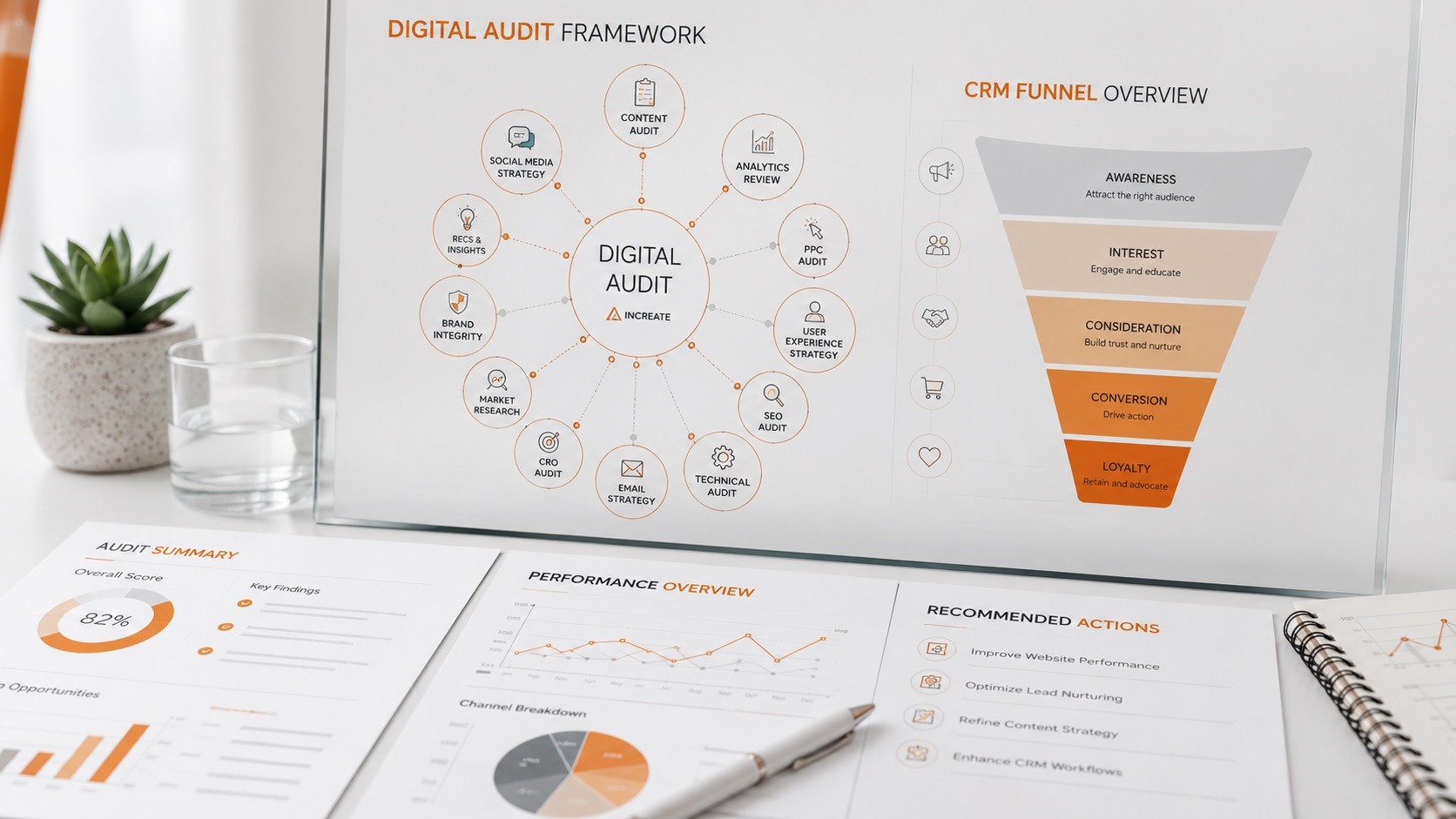
A digital audit covers not only the website, but also CRM, SEO, advertising, analytics, content, and technical infrastructure.
What a Digital Audit Includes
The outcome of an audit must be practical. A business does not need a long list of errors — it needs a clear map: what is critical, what can be fixed quickly, what requires a separate budget, and what is not a priority right now.
| Area | What We Review | Why It Matters to the Business |
|---|---|---|
| Website | Structure, UX, forms, page speed, landing pages | Find the points where users get lost or leave without enquiring |
| SEO | Page structure, URLs, meta tags, blog, FAQ, internal linking | Assess the potential for organic traffic and future promotion |
| Advertising | Where traffic lands, page relevance, which campaigns perform | Reduce wasted ad spend and improve lead quality |
| CRM | Lead transfer, UTM data, statuses, sales funnel, follow-ups | See lead quality and stop losing enquiries |
| Analytics | GA4, GTM, events, goals, conversions, dashboards | Understand what happens on the website and after an enquiry |
| Content | Case studies, photos, copy, FAQ, blog, expert articles | Strengthen trust, SEO, and conversion |
| Technical setup | Servers, access, backups, contractors, ownership | Reduce operational and technical risks |
When a Simple Website Is Enough — and When You Need a Digital System
| Situation | A Simple Solution Is Enough | A Digital Audit / System Is Needed |
|---|---|---|
| Small business with a basic service presentation | Brochure website, forms, contacts, basic analytics | When you plan to invest in ads, SEO, or scaling |
| Small e-commerce store | CMS, catalogue, online payments, basic analytics | When there is traffic but few sales, or the checkout is complex |
| Mid-sized business | Individual improvements may work for a while | When there is a CRM, ads, SEO, contractors, and several sales channels |
| Company with several websites | Supporting each website separately | When you need a single map of assets, access, analytics, and priorities |
Why Your Website Should Be Part of Your Business’s Digital System
For a small business that is still testing its niche, a simple showcase website can be a perfectly good solution. If you just need to present your services, contact details, or basic company information, a complex digital system is not always necessary.
The situation changes when a website must do more than simply exist and has to work for the business: generate leads, sell, support advertising, rank in Google, pass data to the CRM, and help the sales team. That is why website development for a growing business should start with an analysis of goals, structure, and future sales channels.
For a mid-sized business, the website is often just one part of a bigger system. A company may have a main corporate website, an online store, a separate catalogue, product landing pages, regional websites, a CRM, advertising, SEO, social media, email marketing, servers, access credentials, contractors, and analytics.
When none of this is connected, chaos follows. The website lives separately, ads live separately, the CRM lives separately, and so do the managers. Analytics is incomplete, access is scattered, and a new marketing director cannot tell where things are, who is responsible for what, or which channels actually bring results.
The Website and the Customer Journey: From Ad Click to Repeat Sale
In a well-built digital system, the customer journey looks like this:
The website is a key part of this chain, but not the only one. If ads are poorly set up or attract the wrong audience, even a great website will not deliver the expected results. If the website is easy to use but a manager replies two days later, some sales will still be lost. And if enquiries are not recorded in a CRM, the business cannot tell which channels really work.
Once an enquiry is submitted, another part of the process begins. Ideally, it should land in the CRM, be duplicated by email or messenger, and be picked up by a manager right away. From there, what matters is the quality of communication, response time, the commercial proposal, follow-ups, and ongoing work with the client.
How a Website Drives Sales: UX, UI, Content, and Trust
A website does not sell through design alone. Visuals matter, but logic, structure, a clear user journey, content, trust, and well-placed conversion points matter even more.
For e-commerce
E-commerce website development should focus on making purchases effortless: users must be able to find a product quickly, filter by the right parameters, understand the price, delivery terms, specifications, and warranty, and place an order without unnecessary steps. That requires:
- a clear catalogue and filters;
- well-designed product pages;
- a simple cart and checkout;
- connected payment and delivery options;
- order statuses;
- order transfer to the CRM or CMS;
- fast page loading.
For a small online store, a digital audit can be even more important than for a simple corporate website, because every UX mistake directly affects sales. An inconvenient catalogue, weak filters, a long checkout, missing payment options, unclear delivery terms, or a poor product page can drain your advertising budget every single day.
For corporate websites
Corporate websites are a different story. When a company sells services, UX and structure are not enough — brand trust becomes essential. A corporate website for a law firm, an agricultural business, a manufacturer, or a B2B company has to reflect the level of the business.
Brand identity, a modern UI, case studies, testimonials, expertise, a description of the work process, the team, an FAQ, and at least some guidance on budget or cooperation formats all play a role. Visitors should not just see a beautiful website — they should feel that the company can be trusted.
How to find UX issues
To find weak spots in UX, use behavioural analytics: Hotjar, Microsoft Clarity, heatmaps, and session recordings. UX/UI design and a professional UX audit also help: they reveal where users stop, what they do not click, which blocks they ignore, and why they never reach the enquiry form.
Growing your conversion rate does not always require a full redesign. Often it is enough to restructure a page, move a button, simplify a form, add a trust block, or make a landing page more relevant to the ad that brought the visitor in.
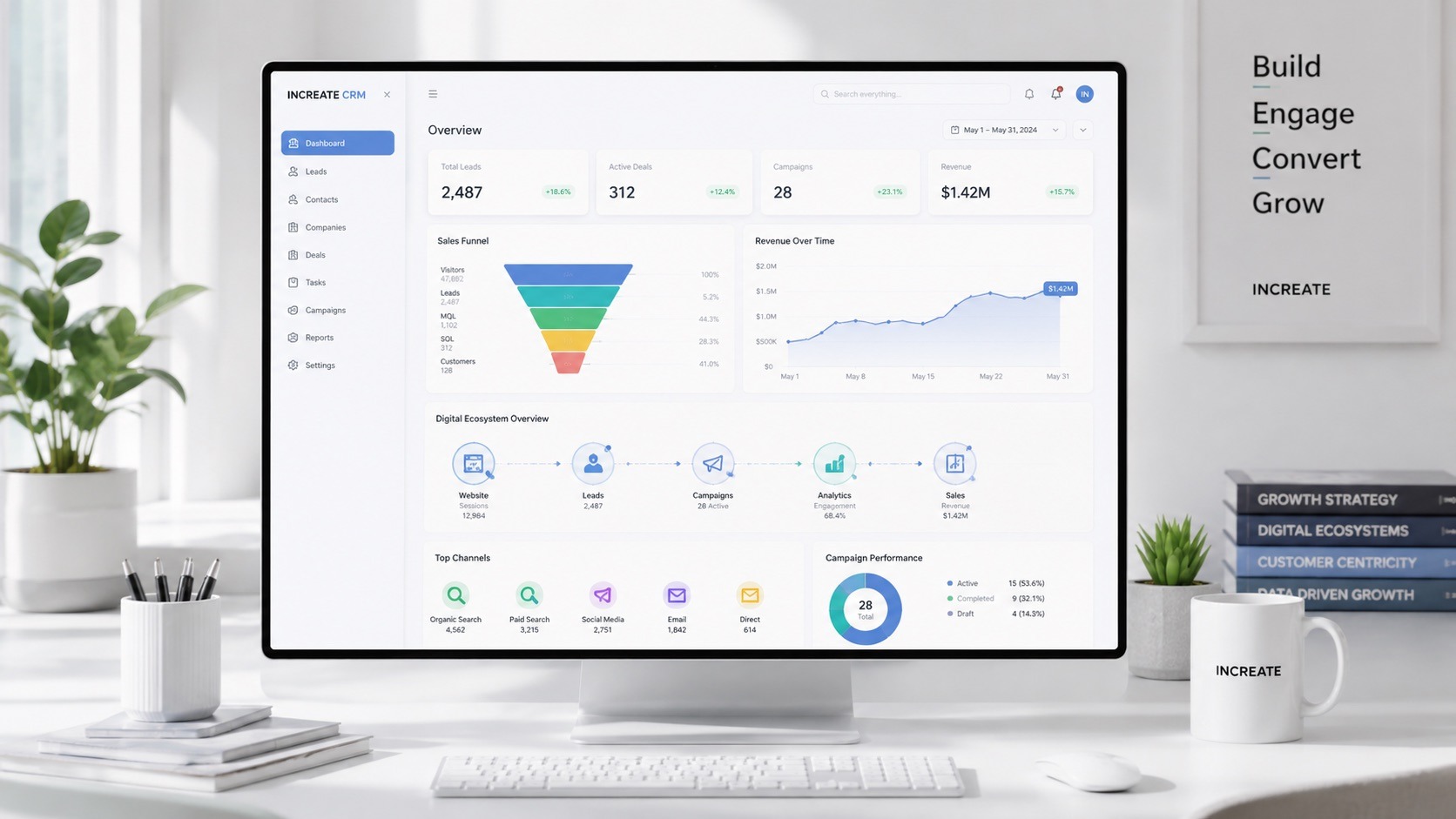
A digital audit evaluates not only design, but also the user journey, leads, traffic sources, and conversions.
In INCREATE’s practice, a UX audit often shows that the problem is not an “unattractive” website but small decisions that block enquiries: a button in the wrong place, a form that asks for too much, a landing page that does not match the ad, or a lack of visible proof of trust.
CRM and Leads: How Your Website Should Pass Data to Your Sales Team
A CRM is not always essential from day one. For a simple corporate website with a small number of enquiries, email, a messenger, a phone call, or the website’s admin panel may be enough. When enquiries are few, a business can process them manually for a while.
However, a CRM becomes almost essential once the number of enquiries, orders, or follow-ups exceeds what can be handled manually. For e-commerce, online catalogues, and B2B sales, this usually happens fast.
You can see orders in your website’s CMS, but this functionality is often basic. It works for a small business or a low volume of sales. When orders reach dozens or hundreds, you need a system: statuses, a sales funnel, tasks for managers, repeat orders, promotions, personalised offers, processing control, and analytics. This is where professional CRM and ERP integration pays off.
For a corporate website, it is often enough to pass the name, phone number, email, the page the form was submitted from, the service type, and the user’s comment. For e-commerce or a catalogue, much more data is needed: the product, order contents, total amount, delivery method, payment, UTM tags, traffic source, ad campaign, status, and order history.
This data lets a business analyse not only the number of enquiries but the quality of each channel. One channel may bring many cheap leads that almost never convert. Another may bring fewer leads but a much higher average order value.
Analytics: Why Traffic and Enquiries Do Not Equal Sales
Almost every modern website needs Google Analytics. It shows user behaviour well: traffic, sources, pages, events, conversions, popular content, and basic user actions.
The problem is not that Google Analytics is a weak tool. The problem is that businesses often look only at traffic and enquiries without seeing which of them became real sales. To see that, you need a connection to the CRM.
A systematic approach relies on a clear chain: website → event → UTM → CRM → manager → sale. With it, a business can trace the path from click to result: which channel the user came from, which pages they visited, what enquiry they left, which manager handled it, what was offered, whether a sale took place, and what the order value was.
It is also important to separate responsibilities. A digital system can bring traffic, generate leads, and pass data along. But the actual sale depends on how quickly managers respond, the quality of the commercial proposal, the product, the price, follow-up communication, and the client’s own team.

Deep analytics becomes possible when the website, CRM, and advertising sources are connected.
SEO and Content: How a Website Earns Organic Demand and Builds Trust
A website can capture organic demand through far more than its home page. In most niches, the home page covers only part of the demand. Service pages, categories, case studies, a blog, FAQ, expert articles, guides, comparisons, and video content offer much more opportunity.
A blog is not just “company news”. For a business, it can become part of its SEO strategy, a source of brand trust, and a way to stay visible in AI-generated answers.
When a company regularly publishes expert articles, case studies, guides, answers to customer questions, YouTube videos, and short social media clips — and links them to relevant pages on its website — it gradually builds a content ecosystem.
Case studies are the strongest sales content. When potential clients see that a company has already delivered a similar project, product, or service, their trust grows. Testimonials, team photos, a transparent work process, numbers, guides, expert articles, and video work the same way — take a look at our projects for examples.
Visual content deserves special attention. In many projects, it shapes most of how a website is perceived. For hotels, business centres, real estate, products, and catalogues, visuals can account for 70–90% of the first impression.
It is also worth considering GEO — Generative Engine Optimization. SEO is still the foundation of search visibility, but expert, well-structured, and genuinely useful content should already be created with the understanding that it will be analysed not only by people and Google, but also by AI-powered search.
Advertising, Social Media, and Landing Pages
Advertising and the website form one of the most important links in a digital system. Even a great website will not deliver results if it receives irrelevant traffic. And the opposite is true too: a strong ad campaign loses effectiveness if it sends users to an irrelevant page.
Ad traffic does not always need to go to the home page. It is often better to create dedicated landing pages for a specific service, product, category, promotion, or audience.
A user searching for a specific service should land exactly on that service’s page. They should not have to click around, dig through the menu, or guess where the right section is. The more precisely a page matches the search query, the higher the chance that the user stays and takes the target action.
Ideally, the SEO brief and advertising logic should be prepared alongside the website itself. They shape the sitemap, the number of landing pages, the block structure, the FAQ, internal linking, and the future content strategy.
Automation, Self-Service, and Customer Portals
A website can reduce your managers’ manual work through automation. For corporate websites, this may include chatbots, widgets with question trees, interactive FAQs, pre-project briefs, or forms that collect more information before the first contact with a manager.
For example, instead of a simple “Request a quote” button, the website can guide the user through a few questions: what type of service they need, their budget, timeline, preferred cooperation format, and whether they have a technical specification. As a result, the manager receives not just a contact but a pre-qualified lead.
For e-commerce, automation may include catalogue suggestions, abandoned cart recovery, order statuses, repeat purchases, wishlists, personalised recommendations, promo codes, reminders, and automated email flows.
For B2B, automation matters even more. When you work with dealers and partners, personalised prices, individual discounts, deferred payments, documents, and repeat orders, custom web application development or a B2B portal can significantly reduce the workload on your sales team.
A customer portal is not always necessary. For a typical corporate website without product logic, it may be an unnecessary feature. For e-commerce, however, a customer account is effectively a standard, and for B2B it often becomes a competitive advantage.

Self-service, customer portals, and automation reduce manual work and help managers focus on higher-quality leads.
Technical Infrastructure: Servers, Access, Backups, and Ownership
Technical infrastructure is one of the most underestimated parts of a digital system.
A mid-sized business may have several websites, different contractors, separate servers, domains, hosting accounts, ad accounts, a CRM, analytics, email services, and access to the CMS, FTP, DNS, Git, Google Analytics, Google Tag Manager, Google Ads, Meta Ads, and other tools.
While the team is small and everyone remembers where everything is, this can work. But when a marketing director leaves, a new CMO joins, or the company scales, the lack of a system quickly becomes a problem. The business needs clear answers to these questions:
- where the website is hosted;
- who has access;
- who is responsible for website maintenance;
- whether backups exist;
- what to do in the event of a cyberattack;
- who manages SEO, ads, social media, and content;
- which websites are still relevant;
- which channels bring in leads.
A digital audit should cover not only marketing but also the technical side. Sometimes access, server management, backups, and unclear ownership become the most critical points of risk.
Common Mistakes Businesses Make Without a Digital Audit
One of the most common mistakes is starting with “we need a new website” without understanding which business problem it is supposed to solve.
Sometimes a new website really is necessary. But sometimes it is enough to run a UX audit, improve existing pages, set up analytics, connect a CRM, refresh the content, or shift the budget towards the channel that actually drives sales. Other typical mistakes include:
- there is no map of all websites and digital assets;
- different contractors work without unified management;
- access, servers, and backups are not organised;
- SEO is only considered after launch;
- ad campaigns lead to irrelevant pages;
- content is not prepared in advance;
- forms do not pass the necessary data to managers;
- the CRM is not connected or is used only on paper;
- enquiries are not linked to actual sales;
- Google Analytics is installed, but there is no deep analytics;
- the website is launched without a clear plan for future promotion channels;
- costly integrations are postponed “for later”, and the architecture has to be rebuilt.
For a small business, a phased launch is perfectly normal. You can start with a simple website, basic analytics, and forms, and then grow the system. But for a mid-sized business, it is important to plan SEO, advertising, CRM, structure, content, and future integrations — at least at the planning level — before or alongside website development.

A digital audit checklist helps make sure nothing important is missed: SEO, content, UX, technical setup, CRM, and analytics.
Digital Audit Example: An Agricultural Company with Several Websites
Imagine a mid-sized agricultural company with several digital business lines.
It has a main corporate website, a separate e-commerce store for agricultural products, fertilisers, and components, a tyre sales division, logistics websites for domestic and European routes, regional office websites, and product landing pages for ads, trade shows, or social media campaigns.
Each of these websites may serve its own purpose. One presents the brand. Another sells. A third supports logistics. A fourth promotes a specific product or ad campaign. A fifth targets a separate market.
If all of this is not brought together into a single system, it is hard for a new marketing director to understand the situation quickly. Where are the credentials? Which websites are still relevant? Who maintains them? Where are the backups? Which ad campaigns are active? Which pages are being promoted in search? Which channels bring in leads? Where is the CRM? Are UTM tags being passed? Who is responsible for social media, PPC, the blog, and technical support?
In a case like this, a digital audit does more than “evaluate the websites”. It creates a map of the entire digital system: which assets exist, what they do, who is responsible for them, where the risks are, and which areas should be developed first. As a result, the marketing director gets a clear decision-making framework instead of a chaotic list of tasks: what to maintain, what to rebuild, what to promote, and where not to invest yet. This is a typical situation in the agricultural business projects we work on.
How INCREATE Approaches a Digital Audit
INCREATE does not approach these projects with “let’s design a new website right away”. We start with analysis. First, we need to understand which business problem the website or digital channel should solve — and only then choose the format: new development, a redesign, a UX audit, CRM integration, an SEO structure, or a technical clean-up.
We begin by understanding the business: which business lines it has, what products it sells, which websites already exist, which traffic channels work, which contractors are involved, how enquiries are handled, whether there is a CRM, and what the situation is with SEO, content, advertising, analytics, and technical support.
The process may include a brief, video calls, meetings, an analysis of the current websites, a UX/UI audit, a structure review, a basic SEO analysis, and a review of forms, CRM logic, ad landing pages, content, servers, and access. This is part of our web development consulting and research services.
As a result, the business receives not just a list of problems but a prioritised set of tasks: what to do first, what can move to the second stage, where an improvement is enough and where new development is needed, what can be automated, which pages are worth promoting, which integrations are critical, which risks must be addressed, and which direction has the greatest potential business impact.
What a Business Gets After a Digital Audit
The result of a digital audit should not be a document full of errors but a clear action plan. The business should see which problems are critical, which can be solved quickly, which need a separate budget, and which are not a priority at this stage. Typically, the deliverables include:
- a map of current digital assets;
- a list of problems and risks;
- prioritised tasks;
- recommendations for the website, UX, and landing pages;
- recommendations for CRM, analytics, and lead transfer;
- recommendations for SEO and content;
- a list of technical risks: servers, access, backups, contractors;
- a plan for the first stage of work;
- a clear answer on whether you need a new website, a redesign, a UX audit, a CRM, or integrations.
Why a Digital Audit Can Be a Better Investment Than a New Website
A new website is not always the best first step.
Sometimes a business really does need a complete build from scratch. But sometimes the problem is not the website at all. Ads may be sending traffic to the wrong pages. The website may not be passing enquiries to the CRM. There may be no SEO structure. Managers may not be processing leads on time. Or there may simply be no content, case studies, or visual materials.
A digital audit helps you avoid spending your budget at random. For example, a company may want a new corporate website. But the analysis may show that the corporate website only needs a light update, and the main budget should go into the e-commerce store that actually generates sales — or into an SEO structure, a CRM, analytics, content, or a customer portal.
An ecosystem approach can cost more at the start because it requires analysis, a team, and time. But in the long run, it pays off: decisions are based on a real picture of the business, not on intuition.
Conclusion
For a modern business, a website is not a standalone digital object that you can simply “design, code, and launch”. In many cases, it is part of a wider system that includes advertising, SEO, CRM, analytics, content, sales, follow-up communication, automation, and technical infrastructure.
For a small business, a simple website may be enough to start with. But for e-commerce, mid-sized companies, businesses with several lines of activity, B2B sales, or a complex digital structure, it is important to look at the bigger picture.
Before building a new website, you should understand what you already have, what works, what does not, and which tasks have the highest priority. Sometimes the answer is a new website. Sometimes it is a UX audit. Sometimes a CRM. Sometimes an SEO structure. And sometimes it is analytics, content, servers, access, or automation.
A digital audit helps you see the whole picture and make the right decision.

Frequently Asked Questions
What is a website or project digital audit?
A digital audit is a comprehensive analysis of a business’s digital presence: the website, advertising, SEO, CRM, analytics, content, technical infrastructure, access, contractors, and business goals. At INCREATE, it is not just a checklist of errors but a way to set priorities: what really affects leads and sales, what creates risks, and what can wait until the next stage.
How is a digital audit different from an SEO audit?
An SEO audit focuses on organic search: structure, indexing, meta tags, content, technical optimisation, and internal linking. A digital audit is broader: it covers not only SEO but also advertising, CRM, lead handling, analytics, UX, content, servers, access, contractors, and business processes.
Who needs a digital audit?
A digital audit is especially useful for mid-sized businesses, e-commerce projects, and companies with several websites, B2B divisions, a CRM, multiple ad channels, and a complex sales structure. It can also help a small online store understand why the website does not sell or why ads are not delivering the expected results.
Does a small business need a digital audit?
For a simple brochure website, a digital audit may be unnecessary. But for a small online store or catalogue, it can be very valuable, because it helps uncover problems with UX, checkout, advertising, analytics, catalogue structure, and repeat sales.
Do you always need a new website after a digital audit?
No. Sometimes the audit makes it clear that a new website is not the top priority. The outcome may be a UX audit, a content update, CRM integration, an SEO structure, improved landing pages, an analytics setup, or putting access, servers, and backups in order.
Is it necessary to integrate a website with a CRM?
Not always. For a simple corporate website, email, a messenger, or a form in the admin panel may be enough at the start. But for e-commerce, B2B sales, catalogues, and growing businesses, a CRM is almost essential: it helps you control enquiries, statuses, managers, follow-ups, and sales.
Why is Google Analytics not enough for deep analytics?
Google Analytics shows traffic, sources, pages, and basic conversions. But it does not always show which enquiries turned into real sales. Deep analytics requires the chain website → event → UTM → CRM → manager → sale, so the business can see not only leads but also the quality of each channel.
How long does a digital audit take?
It depends on the scale of the project. For a single website or a small online store, an audit can take a few business days and quickly reveal problems with the catalogue, filters, checkout, forms, analytics, or order transfer. For a company with several websites, a CRM, advertising, SEO, contractors, and complex technical infrastructure, a deeper analysis and several rounds of discussion are needed.
How does INCREATE conduct a digital audit?
INCREATE analyses the current state of your digital presence: websites, structure, UX/UI, CRM, SEO, advertising, content, analytics, servers, access, and business goals. Then the team prepares not just a list of errors but a prioritised plan: what to improve, what to build, what to automate, which risks to address, and which steps to take first.


Something went wrong. Please try submitting the form again.